
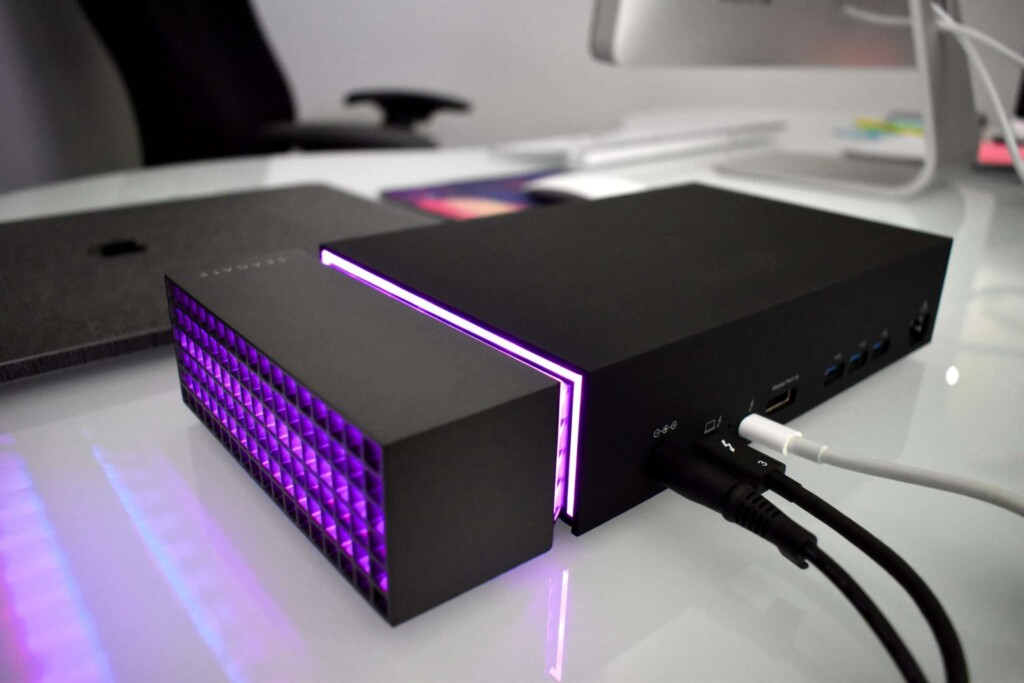
Is this sleek, quietly powerful “warhorse” of an external hard drive and docking station the right fit for me? It seems that just about anyone who owns a computer – especially those with a slim laptop, should consider the value of an external drive. With so many options on the market, the real question becomes: which type and brand will best suit your personal needs? To answer that, let’s start by breaking down the common uses and benefits of an external hard drive.
Much of our digital life now lives in the cloud. Phones and tablets usually back themselves up automatically, while photos and videos are often stored with services like Google Photos or Apple Photos. We stream our music and movies, and our devices stay up to date without much thought. That convenience works wonderfully – most of the time.
Still, many consumers who turn to external hard drives will tell you that keeping important files organized locally, backed up securely, and readily accessible matters a lot. Large files, like games, raw video footage, high-resolution photos, movies, 3D projects, or extensive music collections—feel safer stored close at hand. Plus, local storage gives you immediate, fast access without relying on an internet connection. So, with that in mind, what unique advantages does the FireCuda Gaming Dock offer as your primary external storage solution compared to other products?

The Seagate FireCuda Gaming Dock comes equipped with 4TB of built-in storage, giving you plenty of room for those massive files and instant access when you need them. But what truly sets it apart are three standout features that make it unlike nearly anything else on the market.
- 1. A True All-in-One Dock
- The FireCuda Gaming Dock connects to your computer through a single USB-C Thunderbolt 3 port, instantly transforming into a full docking station. That means you can keep your devices plugged in at all times or quickly add peripherals without constantly reaching behind your laptop or desktop. Everything works right out of the box—no drivers required. You’ll get 4 USB 3.1 Gen2 ports, 1 USB 3.1 Gen2 battery-charging port, an Ethernet port, a DisplayPort, 3.5mm audio-in/mic and audio-out jacks, plus an additional USB-C Thunderbolt 3 port for accessories. It even comes with international power adapters, making it travel-friendly from the start.
- 2. Customizable RGB Lighting
- A little style goes a long way, and the FireCuda delivers with fully customizable RGB LEDs. Using Seagate’s Toolkit software (available for both Windows and Mac), you can set up to six colors per palette, adjust brightness with a slider, and decide whether the lights stay on, sleep with your display, or pulse in one of four dynamic patterns: breathe, solid, blink, or spectrum. Beyond the lighting, the Toolkit also doubles as a powerful backup manager, helping you keep your data safe and organized.
- 3. Hidden NVMe SSD Expansion
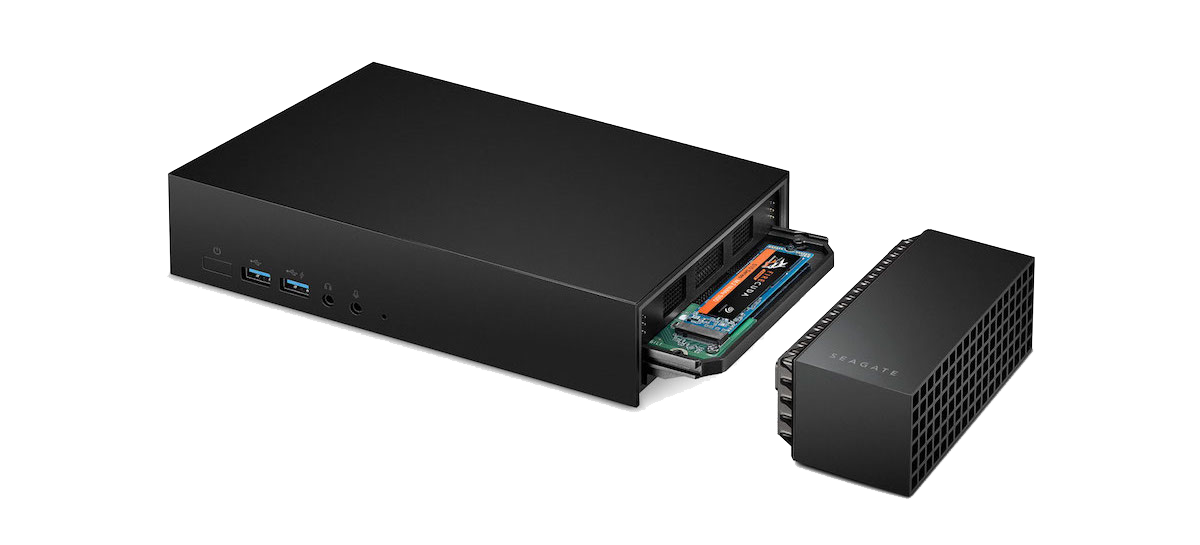
- One of the FireCuda’s most impressive tricks hides under its glowing LED end cap: an expandable M.2 NVMe SSD slot. This gives you the option to install a blazing-fast drive like the FireCuda 510 NVMe SSD (sold separately) for performance that’s over 10x faster than the built-in 4TB HDD. Perfect for video editing, high-end gaming, VR, 3D modeling, or animation, this upgrade transforms the dock into a true powerhouse for speed-demanding tasks—while keeping everything under one sleek unit.
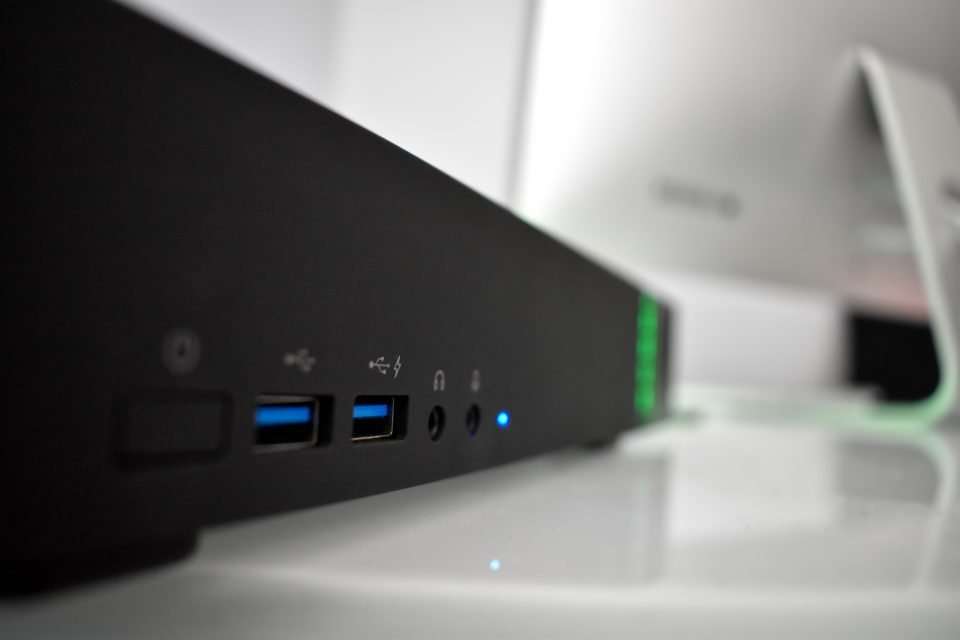
These features make the FireCuda Gaming Dock an excellent choice for anyone who needs a reliable, central hub for storage and connectivity. It’s designed to stay put on your desk as a permanent docking station, always ready to work. While it isn’t a pocket-sized drive you’d toss in your backpack, it’s still relatively lightweight at under 6 pounds, with dimensions of about 10.5 inches wide by 5 inches deep. That makes it noticeably larger than Seagate’s Backup Plus Portable Drives or other compact externals, but with that size comes far more capability. Although Seagate markets the FireCuda Gaming Dock to laptop gamers – going so far as to call it “The Heart of Your Battlestation” – its appeal extends well beyond gaming. Professionals and everyday users alike can benefit from the speed, organization, and convenience this unit brings to daily workflows.
Pros
- Large 4TB of built-in storage for handling big files with ease
- Expandable M.2 NVMe slot for ultra-fast upgrades
- Customizable RGB lighting with multiple patterns and color options
- Simple setup with quick plug-and-play functionality
- Quiet fan system, even under heavy use
Cons
- Requires a dedicated power outlet to operate
- Comes with a large power brick, which adds to desk clutter
Final Thoughts
For laptop PC gamers, the FireCuda Gaming Dock is an easy recommendation. Its 4TB of built-in storage paired with the option to add an NVMe SSD makes it ideal for storing massive game libraries while still delivering the speed needed for demanding titles.
That said, its appeal goes well beyond gaming. The dock is also a strong choice for creative professionals who rely on programs like Final Cut Pro X, After Effects, or DaVinci Resolve and need both expanded storage and a wider range of connectivity. In my case, using it with a MacBook Pro 15” has been a game changer. With only two Thunderbolt 3 USB-C ports on my laptop, I used to juggle dongles and worry about unplugging devices. Now, with the FireCuda Dock, I have six open ports on the hub plus two on my MacBook—plenty of room for anything I need, without the hassle.
Performance has been excellent. I’ve used the drive for project backups, media storage, and running Final Cut Pro libraries without a single hiccup. The minimalist design, smooth LED transitions, and sturdy build make it both practical and visually striking. Its silicon-padded feet keep it steady on any surface—even glass—while allowing airflow for consistent cooling. It’s a thoughtful design that fits seamlessly into both gaming setups and professional workspaces.
At $350, the FireCuda Gaming Dock represents strong value for what it delivers: a reliable, high-capacity storage hub with fast expandability, rich connectivity, and style to match. For anyone who wants a unique all-in-one solution for storage and docking, this unit won’t disappoint. Available for purchase at Amazon and also from the manufacturer.
